> For the complete documentation index, see [llms.txt](https://requiply.gitbook.io/requiply-docs/llms.txt). Markdown versions of documentation pages are available by appending `.md` to page URLs; this page is available as [Markdown](https://requiply.gitbook.io/requiply-docs/knowledge/settings/organization-settings/accounts/groups.md).

# Permission groups

Build sets of permissions once and assign people to them, instead of ticking the same toggles for every new hire.

A **permission group** is a named set of permissions. Every account in your organization belongs to exactly one group and takes its access from it. Edit a group and every member of it changes at the same time.

Permission groups are what other systems call **roles**. This is the page to open whenever someone on your team cannot see a page, a column, or a button they need, or when you want to stop a member from deleting bookings, seeing prices, or reaching Settings. Requiply has no per-person permissions: you change what a group can do, or move the person into a different group.

Groups live on the **Account groups** tab of **Settings → Organization → Accounts**, at [`https://app.requiply.com/settings/org/accounts?tab=groups`](https://app.requiply.com/settings/org/accounts?tab=groups).

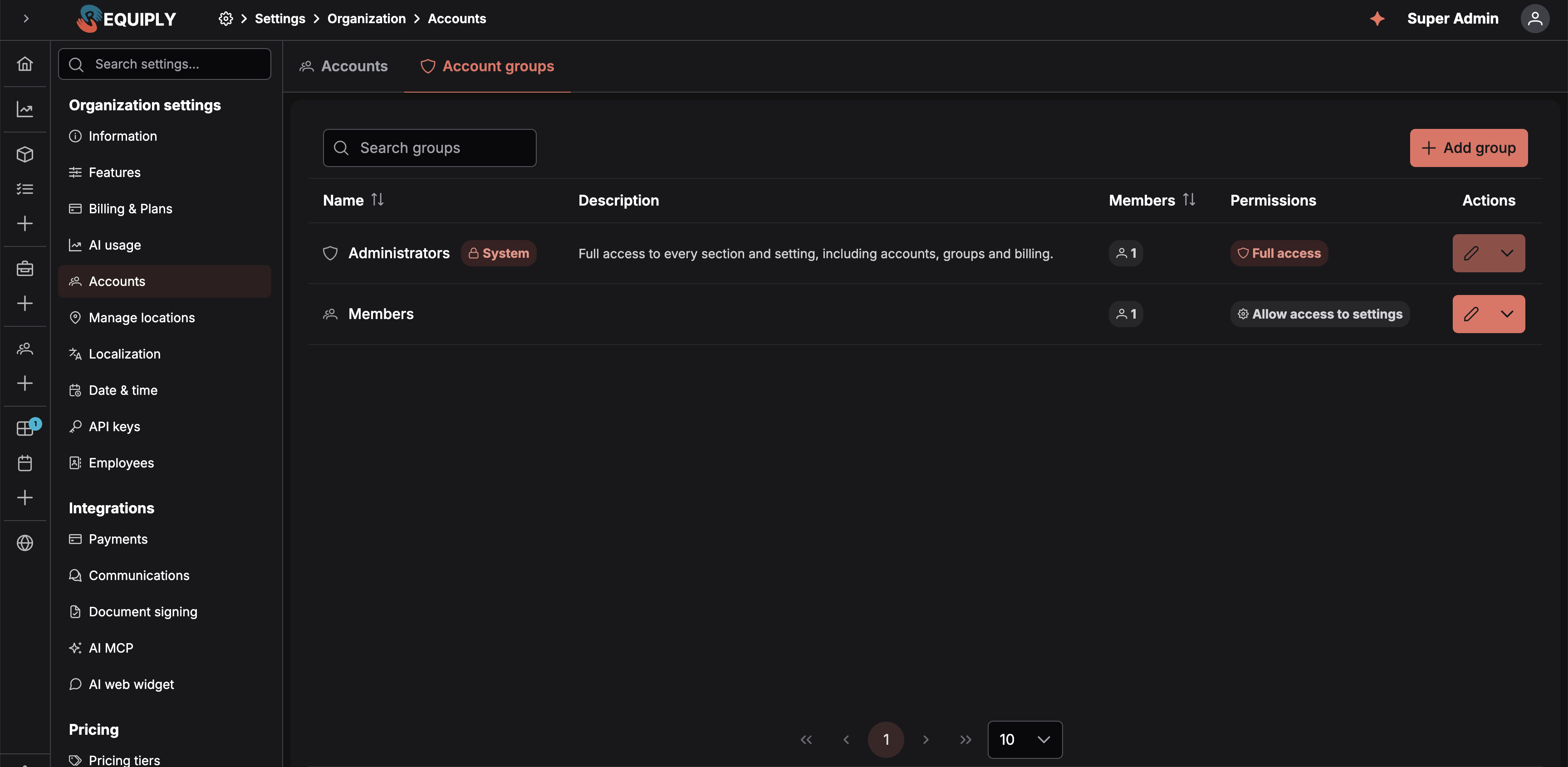
<figure><img src="https://572107616-files.gitbook.io/~/files/v0/b/gitbook-x-prod.appspot.com/o/spaces%2FCrrH3uq16OeTomix4tP8%2Fuploads%2Fgit-blob-caecdafd0e15960630cbbe4211c18ef05a693b04%2Fgroups-table.png?alt=media" alt="The Account groups tab: a search box, an Add group button, and a table listing each group with its name, description, member count, permission summary, and an actions button"><figcaption><p>The <strong>Account groups</strong> tab. <strong>Administrators</strong> carries a <em>System</em> tag and reads <em>Full access</em>, followed by a chip for each Booking creation or Communications permission it has; other groups list the permissions they grant.</p></figcaption></figure>

## The Administrators group

Every organization has one built-in group called **Administrators**. It:

* grants **every access permission**, including account management, groups, and billing,
* **cannot be renamed or deleted**, and its **Access** permissions cannot be switched off,
* has every **Booking creation**, **Communications**, and **Sales** permission on by default, and those **can** be switched off for it, and
* must always have **at least one member**. The last administrator cannot be moved to another group or removed.

It is marked with a **System** tag and a shield icon wherever groups are listed.

## The permissions a group can grant

The group editor has four sections: **Access**, **Booking creation**, **Communications**, and **Sales**. New groups start with every permission off.

### Access

| Permission                        | Controls access to                                                                                                                                                                                                                               |
| --------------------------------- | ------------------------------------------------------------------------------------------------------------------------------------------------------------------------------------------------------------------------------------------------ |
| **Allow booking management**      | The Bookings section and booking management features, including the pickup, return, and overdue lists on the [Dashboard](/requiply-docs/knowledge/dashboard/dashboard.md), and the [checklists](/requiply-docs/knowledge/booking/checklists.md). |
| **Allow inventory management**    | The Inventory section and inventory management features.                                                                                                                                                                                         |
| **Allow services management**     | The Services section and services management features.                                                                                                                                                                                           |
| **Allow client management**       | The Clients section and client management features, including the [Calls](/requiply-docs/knowledge/clients/calls.md) page when Binotel is connected.                                                                                             |
| **Allow access to reporting**     | The Reports section, and the monthly summary and money figures on the [Dashboard](/requiply-docs/knowledge/dashboard/dashboard.md).                                                                                                              |
| **Allow access to conversations** | The [Conversations inbox](/requiply-docs/knowledge/conversations/conversations.md): reading and answering website chat and messenger conversations and taking them over from the AI assistant. Shown only while the inbox feature is on.         |
| **Allow website management**      | The **Booking Page** menu entry, where the [client portal](/requiply-docs/knowledge/client-portal/settings.md) is configured.                                                                                                                    |
| **Allow access to settings**      | The Settings section. A set of administrator-only areas inside it stays limited to the Administrators group regardless of this toggle. See [What Settings access does and does not open](#what-settings-access-does-and-does-not-open).          |

When an **Access** permission is **off** for a group:

* The matching **section is hidden** from the navigation of every member, on the web sidebar and in the mobile app.
* All **functionality tied to that area is blocked** for them, even where it appears inside another part of the product. With **Allow inventory management** off, for example, a member loses the Inventory menu entry *and* cannot create maintenance, adjust stock from a booking, or edit item details.

{% hint style="info" %}
**Allow access to settings** lets a senior operator adjust how the business runs day to day, such as locations, opening hours, deposits, and booking duration, without handing them accounts, billing, pricing, or automations.
{% endhint %}

### Booking creation

These permissions change what a member can do inside the Bookings section they already have access to. Turning one off hides no section; it only removes that capability.

| Permission                                    | What it allows                                                                                                                                                                                                                                                                                                                                                                                                                                                                                                                                                                                                                                                                                                                                                                                                                                                                                                                                                                                                                        | Also needs                                                                                                                                                 |
| --------------------------------------------- | ------------------------------------------------------------------------------------------------------------------------------------------------------------------------------------------------------------------------------------------------------------------------------------------------------------------------------------------------------------------------------------------------------------------------------------------------------------------------------------------------------------------------------------------------------------------------------------------------------------------------------------------------------------------------------------------------------------------------------------------------------------------------------------------------------------------------------------------------------------------------------------------------------------------------------------------------------------------------------------------------------------------------------------- | ---------------------------------------------------------------------------------------------------------------------------------------------------------- |
| **Allow booking outside of working hours**    | Picking a pickup or return time outside the working schedule from [Date & time settings](/requiply-docs/knowledge/settings/organization-settings/date-time-settings.md) when creating a booking or [changing its dates](/requiply-docs/knowledge/booking/edit-dates.md). The date picker then offers every time of day, and every closed day, with times outside the schedule shown in light orange. Saving asks the member to confirm that the pickup or return is outside working hours. Without this permission the picker only offers working hours, and the server rejects times outside them. An outside assistant connected through the [AI integration](/requiply-docs/knowledge/settings/integrations/ai.md) follows the same permission. The public [client portal](/requiply-docs/knowledge/client-portal/client-portal.md) and the [AI web widget](/requiply-docs/knowledge/settings/integrations/web-widget.md) always enforce working hours, and through the API only a secret key can pass `allowOutsideWorkingHours`. | Nothing else.                                                                                                                                              |
| **Allow booking cost adjustments**            | Changing what a booking is charged: fewer or more days or months than its dates produce, a percentage, or a flat amount, depending on the types the organization allows. This covers the **Booking cost adjustment:** block on [Add booking](/requiply-docs/knowledge/booking/add-booking.md) and in mobile booking creation, the **Booking cost adjustment** row and **Edit booking cost adjustment** page on existing bookings, and the `adjustment` field for API keys and AI assistants that act as the member. See [Booking cost adjustment](/requiply-docs/knowledge/booking/chargeable-period.md). Until September 2026 this was **Allow chargeable period adjustment**.                                                                                                                                                                                                                                                                                                                                                       | **Enable booking cost adjustments** under [Features](/requiply-docs/knowledge/settings/organization-settings/features.md#enable-booking-cost-adjustments). |
| **Allow assigning units on booking creation** | Scanning or typing unit codes in the **Units** field on [Add booking](/requiply-docs/knowledge/booking/add-booking.md) and on the **Inventory** step of mobile booking creation, so specific units are pinned to the booking right away.                                                                                                                                                                                                                                                                                                                                                                                                                                                                                                                                                                                                                                                                                                                                                                                              | **Allow assigning units on creation** under [Booking creation](/requiply-docs/knowledge/settings/booking-settings/booking-creation.md).                    |

### Communications

Permissions for client communication features that come from an integration.

| Permission                              | What it allows                                                                                                                                                                                                                                                                                                                                                                                                  | Also needs                                                                                                             |
| --------------------------------------- | --------------------------------------------------------------------------------------------------------------------------------------------------------------------------------------------------------------------------------------------------------------------------------------------------------------------------------------------------------------------------------------------------------------- | ---------------------------------------------------------------------------------------------------------------------- |
| **Allow access to client call history** | Seeing the **Binotel calls** field on [Client details](/requiply-docs/knowledge/clients/client-details.md#binotel-calls) on the web and the **Calls with Binotel** row on the mobile client page, with playable recordings and the **Call** button. The organization-wide [Calls](/requiply-docs/knowledge/clients/calls.md) page is not controlled by this permission: it follows **Allow client management**. | The [Binotel integration](/requiply-docs/knowledge/settings/integrations/communications.md#binotel) in Communications. |

### Sales

Permissions for the [Sales](/requiply-docs/knowledge/sales/sales.md) module, for selling goods such as memory cards and batteries. They take effect only while **Enable sales** is on under [Features](/requiply-docs/knowledge/settings/organization-settings/features.md#enable-sales). While it is off, the section says *Sales is switched off. These permissions apply once you switch it on in Settings > Features.*

| Permission               | What it allows                                                                                                                                                                                                                                                               |
| ------------------------ | ---------------------------------------------------------------------------------------------------------------------------------------------------------------------------------------------------------------------------------------------------------------------------- |
| **Allow viewing sales**  | *Shows sale items, their stock and the list of sales.* The Sales menu section, the [Sales list](/requiply-docs/knowledge/sales/manage.md), sale pages, products for sale in the inventory, and the **Sold items** of bookings.                                               |
| **Allow selling items**  | *Lets members sell items on bookings and on their own, record payments and returns.* [New sale](/requiply-docs/knowledge/sales/new-sale.md), **Sell items** and **Return items** on bookings, editing and cancelling sales, and collecting their payments. Includes viewing. |
| **Allow managing stock** | *Lets members add and edit sale items, record deliveries, write-offs and stock counts, and see purchase prices.* The stock buttons on the [product page](/requiply-docs/knowledge/sales/sale-items.md#stock-movements), net costs, and margins. Includes viewing.            |

**Allow viewing sales** is included in the other two. While **Allow selling items** or **Allow managing stock** is on, it is switched on as well and cannot be turned off, and the editor shows *Included with: Allow selling items*. This keeps what the web app, the mobile app, and the API allow in line with what the group shows.

## What Settings access does and does not open

Turning **Allow access to settings** on lets a group into Settings, but not into everything there. A large part of Settings stays gated to the **Administrators** group whatever this toggle says.

| Opened by **Allow access to settings**                           | Administrators only                                                            |
| ---------------------------------------------------------------- | ------------------------------------------------------------------------------ |
| Organization info, Localization, Date & time settings, Locations | Features, Billing & plans, AI usage                                            |
| The Payments integration                                         | Accounts, permission groups, API keys, Employees                               |
| Booking creation, Booking duration, Deposits, Subrentals         | Communications, document signing, AI, and AI web widget integrations           |
|                                                                  | Pricing tiers and pricing discounts                                            |
|                                                                  | Booking statuses                                                               |
|                                                                  | Email, message, and custom export templates                                    |
|                                                                  | Inventory categories                                                           |
|                                                                  | Workflows                                                                      |
|                                                                  | Fields: entity fields, level configurations, table columns, detail page fields |

The split is deliberate. The left column is the shape of your own working day: opening hours, locations, how long a booking may run, what deposit it takes. The right column changes what the organization *is*, what it costs, what it charges, and who can reach it.

## Creating a group

**Add group** on the Groups tab opens the form.

| Field           | Notes                                                                                                                                                                 |
| --------------- | --------------------------------------------------------------------------------------------------------------------------------------------------------------------- |
| **Group name**  | Required, and unique within the organization. Saving a duplicate name returns *"A group with this name already exists"*.                                              |
| **Description** | Optional. Shown in the groups table, useful for saying who a group is meant for.                                                                                      |
| **Permissions** | The toggles above, grouped into the **Access**, **Booking creation**, and **Communications** sections, all off by default.                                            |
| **Menu layout** | Optional. The order of the sidebar sections and pages for the group's members, and which of them are hidden. See [Menu layout for a group](#menu-layout-for-a-group). |

A **Preview** panel on the right shows how the group will look in the table, permission summary included. **Save** creates the group and returns you to the Groups tab.

## Editing a group

Open a group from its row. The form is the same one used to create it, with these differences:

* For the **Administrators** group, the name and description are shown as plain text with the **System** tag. The **Access** section shows check marks instead of toggles, with the note *Always granted to administrators*. The **Booking creation** and **Communications** toggles can be changed and saved. There is no **Delete** button.
* A **Delete** button appears for ordinary groups.

Saving applies the new permissions to **every member immediately**. People who are signed in pick the change up on their next page load.

## Menu layout for a group

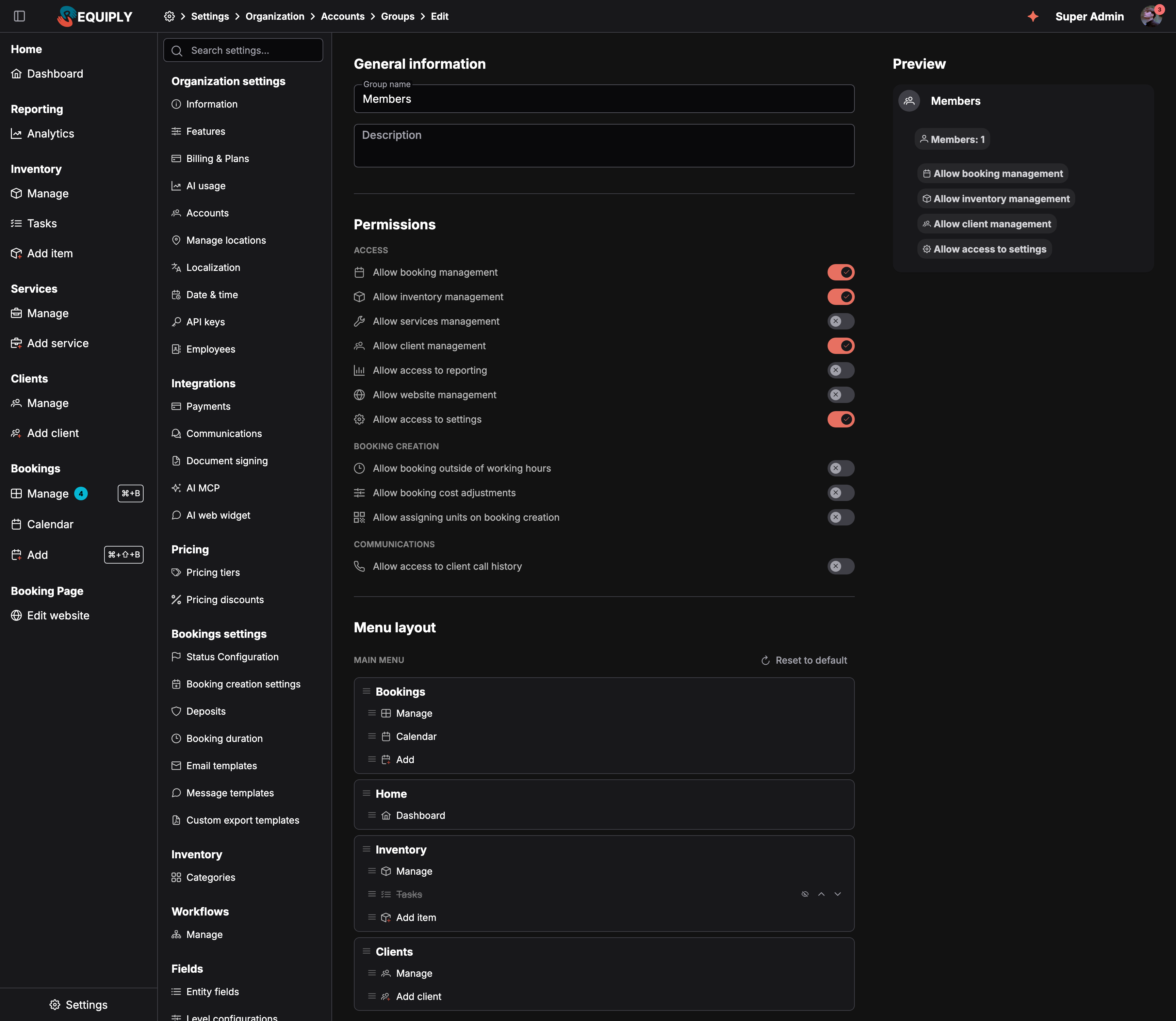
Under **Permissions**, the **Menu layout** section sets how the main sidebar looks for every member of the group: which section comes first, the order of the pages inside each section, and which pages are hidden. It lists only the sections the group's **Access** permissions open, and follows the toggles live while you edit them.

<figure><img src="https://572107616-files.gitbook.io/~/files/v0/b/gitbook-x-prod.appspot.com/o/spaces%2FCrrH3uq16OeTomix4tP8%2Fuploads%2Fgit-blob-4d3e592434783975b5a8b501e755821425c5f5b7%2Fgroup-editor.png?alt=media" alt="Editing the Members permission group. Allow booking management, Allow inventory management, Allow client management and Allow access to settings are on. Below, the Menu layout section shows the main menu with Bookings moved to the top, then Home, Inventory with Tasks hidden and struck through, and Clients. A Reset to default link sits at the top right."><figcaption><p>A group layout that puts Bookings first and hides Tasks for everyone in the group.</p></figcaption></figure>

Drag a section or a page by its grip, or use the **Move up** and **Move down** arrows. Click the eye, **Hide from the menu**, to hide a page or a whole section. **Reset to default** returns to the standard order. The layout is saved with the group's **Save** button.

The **Sales** section appears in the layout once [Sales](/requiply-docs/knowledge/sales/sales.md) is on and the group has a Sales permission. A group layout saved before Sales was switched on keeps it hidden until you show it here.

Members see the group layout as their starting point and can rearrange it further for themselves, but they cannot bring back a page the group hides. Hiding a page only removes it from the menu: it does not take away the permission, so the page still opens from a link. The full behavior is described under [Sidebar menu layout](/requiply-docs/knowledge/settings/menu-layout.md).

## Deleting a group

A group can only be deleted when it has **no members**. Move its people to another group first; until then, the delete action is disabled with the note *"Move all accounts to another group before deleting"*. The Administrators group can never be deleted.

## What happened to per-account permissions

Before permission groups, permissions were toggles on each individual account. When groups were introduced, existing access was carried over rather than reset:

* Everyone who was an **Admin** moved into the **Administrators** group.
* Every other account was grouped by the permissions it actually had: accounts with an identical set landed in the same new group, named **Members**, **Members 2**, and so on.
* Those migrated groups were given **Allow access to settings**, matching what non-admins could reach before the split existed.

Rename and reshape those groups freely. The names are only a starting point.

## Common scenarios

### Warehouse staff who should not see money

Create a group called *Warehouse*, turn on **Allow booking management** and **Allow inventory management**, and leave reporting, clients, website, and settings off. Members can run pickups and returns and manage stock without seeing revenue figures or client records.

### A shift lead who adjusts how bookings run

Create a group called *Shift lead* with every section on, **Allow access to settings** included. They can open Settings and change locations, opening hours, deposit rules, and how long a booking may run. Pricing, statuses, templates, workflows, accounts, and billing stay with the administrators, so the levers that change what you charge and who can log in are not in their hands.

### Front desk staff who should not give discounts

In the front desk group, leave **Allow booking cost adjustments** off and **Allow booking outside of working hours** off. They create bookings within opening hours at the dates' price, and a manager with those permissions handles exceptions.

### Warehouse staff see bookings first

Open the *Warehouse* group, drag **Bookings** to the top of **Menu layout**, hide **Add item** under Inventory, and save. Everyone in the group gets the shorter menu at their next page load.

### Only managers hear call recordings on client pages

Turn on **Allow access to client call history** for the *Managers* group only. Keep in mind that everyone with **Allow client management** can still open the [Calls](/requiply-docs/knowledge/clients/calls.md) page and play recordings there.

### A front desk that sells but does not count stock

Give the *Front desk* group **Allow selling items** (viewing comes with it) and leave **Allow managing stock** off. They can sell and take returns but never see purchase prices or margins. Give the *Warehouse* group **Allow managing stock** for deliveries and stock counts.

### Promoting someone to administrator

Edit their account and change its **Permission group** to **Administrators**. There is no separate role field to change.

### Onboarding three people with the same job

Invite all three straight into the same group. There is nothing per-person left to configure.

## Tips and cautions

{% hint style="warning" %}
**Heads up:** Editing a group changes access for everyone in it. Check the **Members** count in the groups table before you start toggling.
{% endhint %}

{% hint style="warning" %}
**Heads up:** An organization must always keep at least one member in **Administrators**. The last administrator cannot be moved out of the group or deleted.
{% endhint %}

{% hint style="success" %}
**Tip:** Name groups after the job, not the person. *Warehouse* survives staff turnover; *Oleksii's permissions* does not.
{% endhint %}